
Watching the Blocks Move in Disk Defragmenter
There is a modern lie we are all told when we buy technology today: everything should happen instantly.
If your phone takes more than half a second to load a website, or if your laptop takes more than ten seconds to start up from a cold boot, you probably feel a spark of mild irritation. We have been conditioned to expect our digital lives to run at the speed of light, silently and entirely behind the scenes.
But if you owned a computer thirty years ago, patience wasn’t just a virtue—it was a prerequisite.
Back then, computers were loud, physical, mechanical beasts. They didn’t use silent, solid-state memory drives with no moving parts. They used actual, spinning metal platters that whirled around at thousands of revolutions per minute inside a metal box, with a tiny mechanical arm darting back and forth to read your files. It was basically a highly advanced, incredibly delicate record player.
Because these hard drives were physical, they got messy. And when they got messy, your computer slowed to a crawl.
To fix this, Windows gave us a built-in utility tool that became an absolute cultural phenomenon. It didn’t require you to be a computer programmer to understand it. In fact, you didn’t need to do any work at all.
You just sat there, chin in hand, completely transfixed, watching little colored blocks move across a grid.
Welcome to the oddly therapeutic, deeply hypnotic world of Disk Defragmenter.
The Library in a Hurricane
To understand why we had to defragment our drives in the first place, we have to look at how a computer actually stores your files. But don’t worry, we aren't going to get bogged down in computer science jargon.
Let's use a simple analogy.
Imagine your computer's hard drive is a massive library, and every file you save is a multi-volume book series.
When your computer is brand new, the library shelves are empty and perfectly organized. When you save a new file—say, a 10-chapter school essay—the computer's operating system places all ten chapters neatly in a row on the shelf. Everything is together, tidy, and easy to find.
But as time goes on, you start deleting things. You delete some old games, you edit some documents, and you download a few weird screensavers.
Now, you have random empty spaces scattered all over your library shelves.
The next time you go to save a massive new file, the computer looks at the shelves. Instead of waiting to find one big, empty shelf that can hold the entire file, it decides to get creative. It puts Chapter 1 on Shelf A, Chapter 2 on Shelf F, Chapters 3 and 4 in the basement, and the rest of the file on the top shelf in the back room.
This is fragmentation.
The file still exists, but it has been shattered and scattered across the physical surface of your hard drive.
Now, when you try to open that file, the mechanical reading arm of your hard drive has to physically fly back and forth across the spinning metal platters, searching for the scattered pieces of your document like a librarian running through a library in a hurricane.
The result? Your computer starts making a frantic, rattling noise that sounds like a lawnmower chewing on gravel, and your simple text document takes three minutes to load.
The Cruel Irony of Virtual Memory
This physical scattering was bad enough for your files, but it was absolutely catastrophic for your computer's overall speed.
In the nineties, computer memory—what we call RAM—was absurdly, eye-wateringly expensive. Because most home computers only had a tiny sliver of actual memory, Windows had to get creative. When it ran out of real RAM, it would carve out a chunk of your hard drive and use it as "fake" memory, officially known as a Pagefile.
This meant your computer was constantly reading and writing temporary data to your hard drive just to keep basic programs open.
If your hard drive was a heavily fragmented mess, your fake memory was a fragmented mess, too. The mechanical arm on your drive would have to thrash back and forth at breakneck speeds just to load a simple menu. Your entire computer would grind to a halt, turning your expensive machine into an absolute paperweight.
Enter the Digital Puzzle-Solver
To solve this digital chaos, Windows users relied on Disk Defragmenter.
The concept was simple: the software would scan your drive, locate all the scattered, fragmented pieces of your files, and physically pick them up and move them so they were sitting neatly next to each other again. It was the digital equivalent of tidying up the library shelves.
But Microsoft didn't just run this process in the background. They decided to show you exactly how it was happening in real-time.
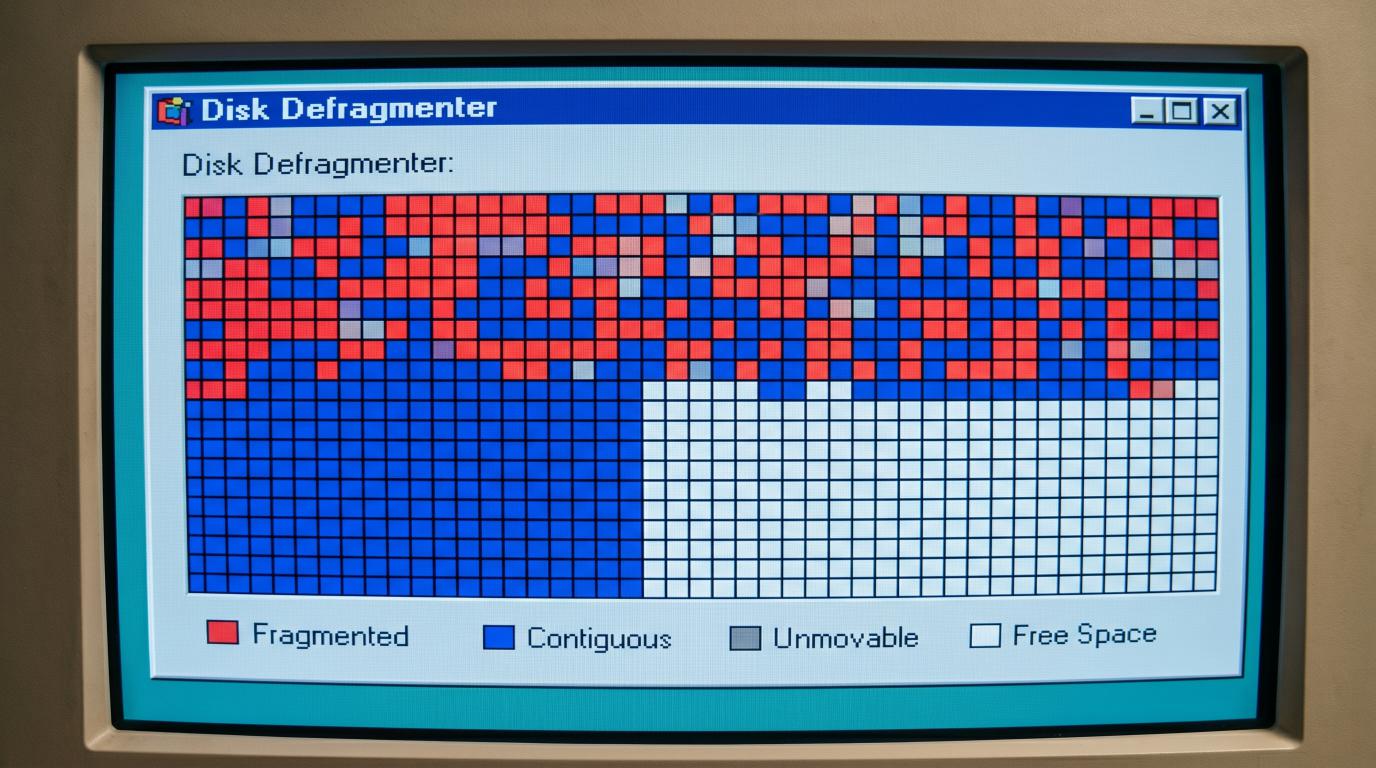
When you opened the utility and clicked "Defragment," the screen would transform into a giant, blank grid. As the computer scanned your drive, the grid would slowly fill up with tiny, colored square blocks.
Disk Defragmenter - Drive C:
+------------------------------------+
| ¦¦¦¦¦¦¦¦¦¦¦¦¦¦¦¦¦¦¦¦¦¦¦¦¦¦¦¦¦¦¦¦¦¦ |
| ¦¦¦¦¦¦¦¦¦¦¦¦¦¦¦¦¦¦¦¦¦¦¦¦¦¦¦¦¦¦¦¦¦¦ |
| ¦¦¦¦¦¦¦¦¦¦¦¦¦¦¦¦¦¦¦¦¦¦¦¦¦¦¦¦¦¦¦¦¦¦ |
| |
| [¦] Fragmented [¦] Reading |
| [¦] Contiguous [¦] Free Space |
+------------------------------------+
Now, if you ask anyone who lived through this era to describe the colors of this grid, they will likely tell you that the fragmented files were Red, the organized files were Blue, and the unmovable files were Green.
This is actually a beautiful bit of collective tech nostalgia—a "Defrag Mandela Effect."
In reality, our brains have mashed two different eras of Windows together. The classic Windows 95 and 98 defragmenter had the iconic, full-screen grid of tiny individual squares, but in that grid, Red actually meant "Bad Sectors"—meaning your hard drive was physically dying! The healthy files were actually dark blue, the unmovable files were green, and the reading/writing blocks flashed in shades of teal and yellow.
It was Windows XP that introduced the clean Red, Blue, and Green color scheme we all remember so fondly. However, XP completely abandoned the grid of individual squares, replacing it with solid, horizontal bar charts that updated in chunky bands.
But whether you remember the classic 95 grid or the XP colors, the goal of the game was always the same: bring absolute order to the digital chaos.
Better Than Television
For a generation of computer users, watching Disk Defragmenter run was a legitimate spectator sport.
There was something profoundly satisfying about watching the computer slowly organize itself. You would sit there and watch a little flashing cursor (the "reading" head) hover over a cluster of chaotic blocks.
Suddenly, a misplaced block would vanish. A second later, a fresh, organized block would materialize in a neat row at the top of the grid.
Yes. Order was being restored to the universe.
You would watch as the program slowly gathered up all the empty white spaces and pushed them to the bottom, consolidating them into one giant pool of potential. It felt like watching a game of Tetris being played very, very slowly by a highly methodical, incredibly tidy robot.
It was deeply therapeutic. In a world where school, work, and life could feel chaotic and disorganized, you could sit in front of your bulky CRT monitor and watch a machine bring absolute, mathematical perfection to its own internal world. Parents would run it to show their kids how "working parts" of a computer behaved. Office workers would start it just to have a valid excuse to stare blankly at their screens for forty-five minutes without feeling guilty.
"I can't work right now," you would tell your boss with a shrug. "I'm defragging."
The Rule of Absolute Stillness
However, defragmenting your computer in the nineties came with one massive, anxiety-inducing catch: you had to leave it completely alone.
And we don't mean you just couldn't use the Defragmenter program itself. We mean you couldn't touch the computer at all.
Because the computer was physically moving data around on a spinning platter, any change to the hard drive's state would throw the software into a complete panic.
If you got bored after twenty minutes of watching the blocks move and decided to open a simple game of Solitaire, or if your early antivirus program did a background scan, the hard drive would write a tiny new file.
The Defragmenter would instantly freeze.
The screen would flash, and a little message would appear at the bottom: "Drive contents changed. Restarting."
[ Defrag Progress: 87% ]
||
/
Mouse is touched
||
/
[ Defrag Progress: 0% ] -> "Restarting..."
Your heart would sink. The entire process would reset. The program would start scanning your entire drive from the very beginning, block by tedious block.
The Secret F8 Safe Mode Hack
Because of this constant resetting, defragmenting became a nocturnal ritual. You started it right before you went to bed, turned off your monitor, and fell asleep to the gentle, rhythmic tick-tick-tick of your hard drive slowly cleaning its room in the dark.
However, power users who didn't want to risk a background process ruining their overnight run developed a secret weapon.
Before Windows booted up, you had to aggressively mash the F8 key on your keyboard. This would bring up a clunky text menu where you could select Safe Mode. This booted Windows in its barest, most skeletal state—no internet, no background utilities, no screensavers, and no antivirus.
Only in the absolute, frozen silence of Safe Mode could you guarantee that the Defragmenter would actually finish its job without throwing a tantrum.
The Death of the Blocks
By the mid-2000s, this visual masterpiece began to fade away.
As computer processors got faster and operating systems became more sophisticated, Microsoft realized that users shouldn't have to freeze their entire lives just to keep their hard drives tidy.
With the launch of Windows Vista and Windows 7, Microsoft changed the way Defragmenter worked. They turned it into a silent background service that ran automatically when the computer was idle.
But the biggest blow to the visual nostalgia of defragmenting came from the software itself. Microsoft completely removed the colorful grid.
In the newer versions of Windows, if you opened the defrag utility, you didn't get to watch blocks move. You were greeted with a cold, grey, boring progress bar that simply read: "Defragmenting... 12% complete."
It was a clinical, sterile experience. The magic was gone.
Today, if you own a modern laptop or desktop, you should never run a traditional defragmentation tool. Modern computers use Solid-State Drives (SSDs). These drives don't have spinning platters, magnetic film, or moving read/write arms. They are entirely electronic.
Because there are no physical parts moving back and forth, a fragmented file doesn't slow an SSD down at all. It can read data from ten different corners of the drive just as fast as if they were sitting next to each other. In fact, running an old-school, aggressive defragmentation tool on an SSD is actually bad for its lifespan, writing unnecessary data and wearing out the drive's memory cells for no performance gain.
That said, Windows hasn't completely abandoned SSD maintenance. Modern versions of Windows secretly run a very gentle, specialized optimization (called TRIM) in the background. Once a month, if you have System Restore enabled, Windows will even perform a highly specialized, safe defrag on your SSD. It does this because the underlying file system (NTFS) still has a maximum limit on how many pieces a single file can be broken into before it causes an error.
But you will never see this happen. It is done in total, silent obscurity.
A Tangible Sense of Progress
There is no denying that modern computers are objectively superior. We don't have to wait twenty minutes for a program to open, we don't have to sit in absolute silence while our drives organize themselves, and our machines don't sound like they are chewing on gravel when we try to load a photo.
But in losing the clunky, mechanical nature of the nineties, we also lost a bit of our connection to the machines we use every day.
Disk Defragmenter was a physical window into the digital world. It was visual proof that our computers were not just magical, silent black boxes, but complex pieces of machinery that required care, maintenance, and a little bit of patience.
So, the next time your modern computer boots up in under five seconds, take a moment to remember the colorful grid. Remember the slow, hypnotic dance of the squares, and the quiet satisfaction of a hard drive finally finding its peace, block by block.
More Retro Technology
If this brought back memories — fond, alarming or accompanied by the sound of a modem — there is more in our Retro Tech section. These three are a good place to continue:
Why Old Technology Still Matters
Older technology is not just there to make modern computers look smug. The machines, languages and limitations of the past created many of the ideas we still use, exposed mistakes worth avoiding and taught developers to make careful choices when memory, storage and processing power were scarce. Understanding how we arrived here helps us build better software now.
A Few Things We Have Built Since Then
TrailTrack brings mapping, route planning, journals and a community together in a way those older machines could scarcely have managed. RiCreate and RiOrganise solve very different problems, but both benefit from the lessons early software taught us: keep the purpose clear, respect the user’s time and make the complicated machinery feel straightforward.
Have Something You Want to Build?
If you have an idea for a website, app or business system, tell us what it needs to achieve. We will bring the modern tools; fond memories of progress bars are optional.
What did Disk Defragmenter actually do?
It rearranged pieces of files stored across a mechanical hard drive so the drive head could read them with less physical movement.
Why did old computers need regular defragmenting?
Saving and deleting files gradually scattered their pieces across a spinning disk. Reorganising them could improve access times on heavily fragmented drives.
Should an SSD be defragmented?
No. SSDs have no moving read head, so traditional defragmentation offers no useful speed benefit and creates unnecessary writes. Modern operating systems optimise SSDs differently.